Grow Your Social Presence
With A Better Content System.
Plan, create and schedule social content around your brand,
audience and goals all from one workspace.
Growing On Social Starts
Before You Publish.
A consistent social presence requires more than posting frequently. You need a clear content direction, the right mix of formats, platform-specific ideas and a practical publishing rhythm. When planning, writing, creative production and scheduling happen separately, keeping that system running becomes difficult.
You Don't Know What To Post Next
Without a structured content plan, posting decisions get made ad hoc. Teams scramble for ideas, recycle the same formats and lose the thread of what the brand is actually trying to communicate week to week.
Creating Content Takes More Than Writing A Caption
Every post needs a concept, a hook, a clear message and a visual direction. When those elements aren't defined before production starts, the work takes longer and the output is less consistent.
Every Platform Needs A Different Approach
Instagram, LinkedIn, Facebook, YouTube and TikTok each have different formats, audiences and content expectations. What works on one rarely transfers directly to another without adjustment.
Consistency Becomes A Manual Task
Keeping a calendar filled and a publishing schedule maintained manually is time-consuming. Without a system, consistency depends on effort rather than process, and that effort isn't always available.
A Growing Social Presence Needs
A System Behind It.
Social growth is built through a combination of consistency, relevance and a clear understanding of what your audience should see from your brand. The goal is not to fill a calendar with content, but to create a planned mix of posts that gives people a reason to follow, engage with and remember your brand.
Know What Your Brand Should Say
Before creating content, you need a clear point of view. What does your brand stand for, what problems does it solve and what should your audience think of when they see your posts?
Know Who You're Speaking To
Different audiences need different messages. Understanding who follows you on each platform — and what they care about — shapes everything from tone to topic to format.
Build A Content Mix
A healthy content calendar includes educational posts, promotional content, community-building moments and brand storytelling. Variety keeps audiences engaged and gives the algorithm more to work with.
Create For The Platform
LinkedIn posts should sound different from Instagram captions. TikToks need different thinking than YouTube videos. Platform-native content performs better and feels more natural to the audience.
Make Publishing Consistent
Sporadic posting limits growth. Building a regular rhythm — even if modest — signals activity to the algorithm and gives your audience a reason to keep coming back.
Keep Improving The Process
Social growth is iterative. What works changes over time. Reviewing performance, adjusting strategy and refining the content mix is a continuous part of building a social presence that compounds.
Turn Your Social Strategy Into A Working
Content Calendar.
BrandStory AI connects your brand positioning, audience and content goals to produce a working content plan — and then helps you execute it from brief through to published post.
Start With Your Brand
BrandStory AI builds a social strategy around your brand profile — your positioning, tone of voice, target audience and the platforms you're active on. This becomes the foundation for every content decision made within the platform.
Plan Your Calendar
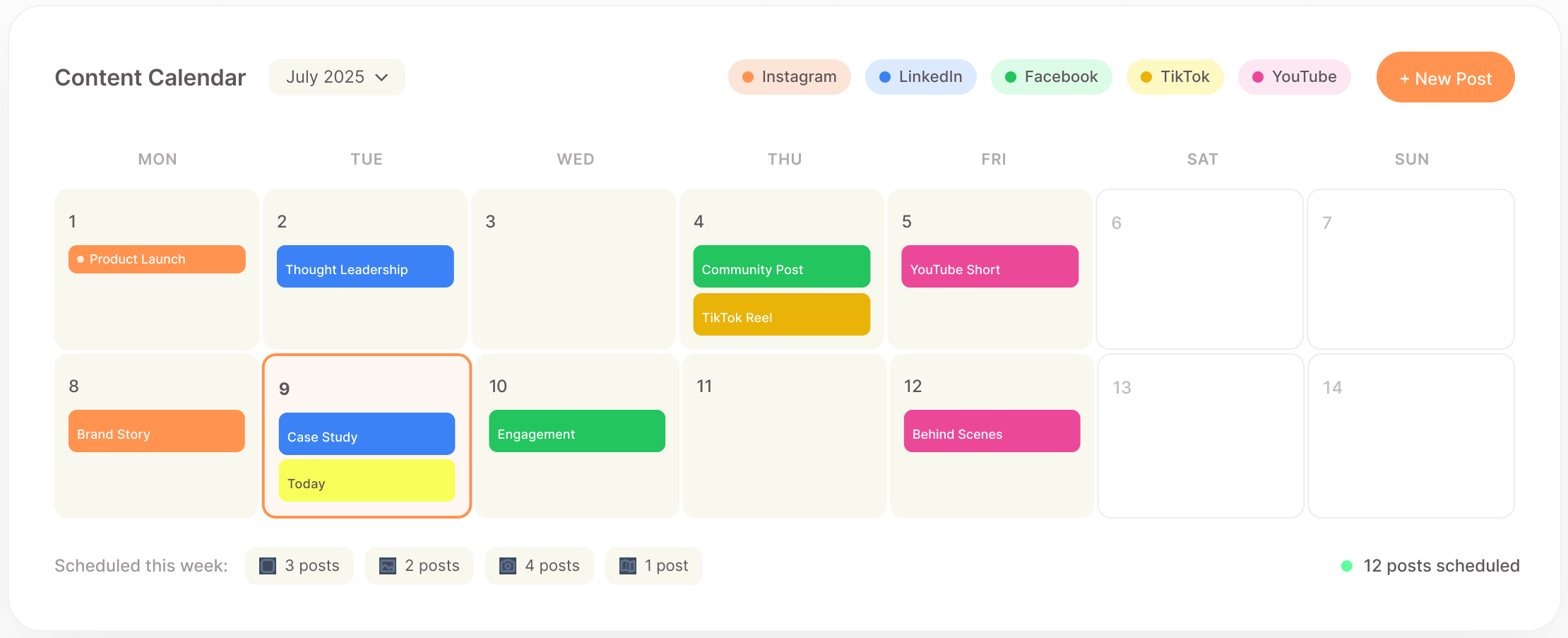
Generate a content calendar that maps out what to post, when and on which platform. The calendar is built around your posting frequency, content funnel and campaign objectives — giving you a structured plan rather than a blank page.
Give Every Post A Direction
Before writing begins, each post gets a brief — a clear content direction that defines the topic, angle, hook and message. This removes ambiguity from the creative process and speeds up execution significantly.
Create The Content
Write post copy directly within the platform using AI assistance. Generate platform-specific captions, headlines, hashtags and calls to action — then refine and edit until the post is ready for production or scheduling.
Create The Creative
Generate social media graphics directly from post content. Produce AI-generated visuals or use the canvas editor to create and customise branded graphics that match your visual identity and the post's message.
Schedule What Is Ready
When a post is approved, schedule it directly from BrandStory AI. Set publish times, manage posts across multiple platforms and maintain a visible publishing pipeline that gives the whole team clarity on what is going out and when.
Social Media Management
Everything From Calendar To Published Post.
A complete workspace for managing social media content — from brand setup and calendar planning through to content creation, visual design and scheduled publishing.
Brand Profiles
Store your brand positioning, tone of voice, target audience and visual identity in a single profile that informs all content created within the platform.
Multi-Platform Management
Manage content across Instagram, LinkedIn, Facebook, TikTok and YouTube from one workspace — with platform-specific settings for each.
Calendar Generation
Generate a structured content calendar based on your posting frequency, platform mix and campaign goals — with a planned content mix built in from the start.
Funnel Planning
Map content to awareness, consideration and conversion stages of the customer journey so the calendar maintains a healthy strategic balance.
Post Strategy
Each post in the calendar is assigned a content type, topic, platform, format and audience segment before any writing begins — giving the creative work a clear direction.
Creative Briefs
Auto-generate a creative brief for every post — defining the hook, message, call to action, visual direction and format before the content is written.
Poster Generation
Generate branded social media graphics using AI image generation — producing ready-to-use visuals from the post brief and brand profile.
Canvas Editing
Edit and customise graphics using the built-in canvas editor. Adjust layouts, typography, colours and imagery to ensure the final visual matches your brand standards.
One Workflow For The Work That
Happens Between The Idea And The Post.
Define The Brand
Set up your brand profile — positioning, audience, tone of voice and active platforms. This foundation shapes everything the AI produces within the workspace.
Plan The Calendar
Generate a content calendar based on your posting frequency and campaign goals. Map out what content types go where and when across each platform.
Balance The Content
Review and adjust the content mix. Ensure the calendar balances educational, promotional, community and brand storytelling content across the planned period.
Shape Each Idea
Generate a creative brief for each post. Define the hook, message, call to action and visual direction so the content has a clear shape before writing begins.
Create The Post
Generate and refine post copy using AI. Write platform-specific captions, headlines, hashtags and calls to action — then edit until the content reflects the brand voice.
Create The Visual
Generate branded graphics from the post brief using AI image generation. Edit and customise in the canvas editor until the visual is ready for use.
Review The Calendar
Review the full calendar in progress. Check that the planned content aligns with upcoming campaigns, adjust timing and confirm the mix still reflects strategy before anything is scheduled.
Schedule & Publish
Schedule approved posts directly to connected platforms. Manage the publishing queue, set times and maintain visibility over everything going out — all from one place.
Build A Social System Around The Way
Your Brand Actually Communicates.
Build A Consistent Brand Presence
Use BrandStory AI to produce a regular, recognisable stream of content that reinforces your brand positioning, builds familiarity and establishes your voice across every platform you're active on.
Create Educational Content
Plan and produce educational content that helps your audience understand your industry, product or process — building trust and positioning your brand as a credible source of knowledge.
Create Product-Led Content
Showcase your product or service through demonstration posts, feature highlights, customer stories and use case content — without every post feeling like a sales pitch.
Plan Campaign Content
Build content calendars around product launches, promotions or seasonal campaigns — planning the full sequence of posts needed to build awareness and drive action across the campaign period.
Manage Multiple Platforms
Maintain an active presence on Instagram, LinkedIn, Facebook, TikTok and YouTube simultaneously — adapting content for each platform from a single planning and creation workspace.
Manage Multiple Brands
For agencies and multi-brand businesses, manage separate brand profiles, calendars and content streams within a single workspace — keeping each brand's content distinct and on-strategy.
Create Content In Batches
Plan, write and design multiple posts in a single session rather than creating content one post at a time. Batching makes production more efficient and keeps the calendar consistently filled ahead of schedule.
Build A Repeatable Publishing Process
Establish a consistent workflow — from brand setup and calendar planning through to content creation, visual production and scheduling — that the whole team can follow and repeat each month.
Make Social Media Easier To Run
Consistently.
BrandStory AI gives your team a structured, repeatable workflow for planning, creating
and publishing social content so you spend less time managing the process and
more time building a presence that grows.
Everything You Need To Know
What is BrandStory AI's Social Media Management product?
It is a workspace for planning, creating and scheduling social media content. It connects your brand profile to calendar generation, post strategy, content creation, graphic design and publishing in a single workflow.
Which social media platforms does it support?
BrandStory AI supports Instagram, LinkedIn, Facebook, TikTok and YouTube. You can manage content for all platforms from one workspace, with platform-specific settings and content guidance for each.
Does BrandStory AI generate the content calendar automatically?
Yes. Based on your brand profile, posting frequency and campaign objectives, the platform generates a structured content calendar with a planned mix of content types, platforms and timing across the selected period.
What is a post brief and why does it matter?
A post brief is a short document that defines the direction of a post before writing begins — including the hook, core message, call to action and visual direction. Briefs ensure that every post has a clear purpose and reduce the time spent deciding what to say.
Can I write and edit post copy within BrandStory AI?
Yes. You can generate post copy using AI and edit it directly within the platform. All writing, refinement and finalisation happens in one place — you do not need to switch between tools to complete the content.
Does BrandStory AI create graphics and visuals for social posts?
Yes. The platform includes AI-powered poster generation for creating branded social media graphics, as well as a canvas editor for customising and adjusting visuals before they are scheduled or exported.
Can I schedule posts directly from BrandStory AI?
Yes. Once a post is approved, you can schedule it to publish directly to connected social platforms from within BrandStory AI. You can manage the publishing queue, set times and view upcoming content across all channels.
Is BrandStory AI suitable for managing multiple brands?
Yes. You can create separate brand profiles for each brand, with individual calendars, content strategies and publishing pipelines. This makes BrandStory AI suitable for agencies, franchise businesses and organisations managing multiple brands.
Can teams collaborate within BrandStory AI?
Yes. Multiple team members can work within the same workspace, contributing to the calendar, writing content, reviewing briefs and approving posts. The shared view of the calendar ensures the whole team has visibility over what is planned and what is in progress.
Does BrandStory AI help with content strategy, or just content creation?
It does both. The platform starts with brand positioning and audience definition, generates a content strategy and calendar plan, and then supports execution through content creation, visual design and scheduling — covering strategy and production in one workflow.
How does BrandStory AI handle platform-specific content differences?
The platform understands that each social network has different formats, audiences and content expectations. Content generation and briefing is tailored to the platform assigned to each post, so Instagram captions, LinkedIn posts and TikTok scripts are each handled with the appropriate approach.
How does the content funnel planning feature work?
The funnel planning feature maps content to the awareness, consideration and conversion stages of the customer journey. This ensures that the content calendar includes posts designed to attract new audiences as well as posts intended to convert followers into customers.